
SCTE-35 Monitoring

SCTE-35 monitoring for DVB broadcast

See cue markers, splice points, and timing in the same monitoring workflow as your transport and video alarms. Store SCTE-35 messages, review cue history, and keep reporting data ready for later analysis when timing or delivery needs to be proven.

Why SCTE-35 monitoring matters

Ad breaks depend on timing

A cue that is present but late can still break the break. You need timing visibility, not only marker presence.

Broadcast and IP must stay aligned

Different delivery paths can carry the same cue in parallel. If they drift, the viewer experience drifts too.

Operators need proof

When a cue fails, the team needs a timeline and context, not just a generic alarm and a guess.

Cue visibility

See the marker, the timing window, and the service context

SCTE-35 monitoring is most useful when it shows the cue itself alongside the stream health around it. That gives operators a direct view of what arrived, when it arrived, whether the rest of the chain was ready for it, and what needs to be retained for later reporting.
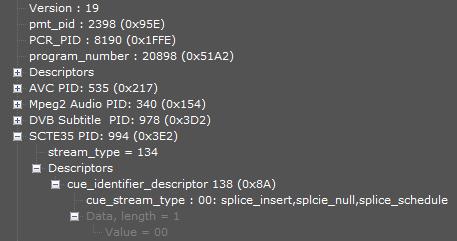
  • Detect services and PID entries carrying SCTE-35 in PSI/PMT
  • Splice points and time signals visible in a monitoring timeline
  • Packet-level parsing and service-level views for SCTE-35 sections
  • Missing, late, or duplicated markers highlighted clearly
  • Correlation with transport stream and service health alarms
  • Context for ad insertion, blackout handling, and regional breaks
  • SCTE-35 messages stored for reporting and post-event analysis
Dualz SCTE-35 monitoring dashboard showing cue marker timing and service status
Operational checks

Trace cue data from signal detection to exportable reports

Most SCTE-35 incidents are not full outages. They are subtle problems that only become obvious when the next commercial break, blackout, or regional replacement is supposed to happen, which is why the platform needs both live view and retained evidence.
  • Marker arrives too late for downstream insertion
  • Marker is present but does not match the expected event
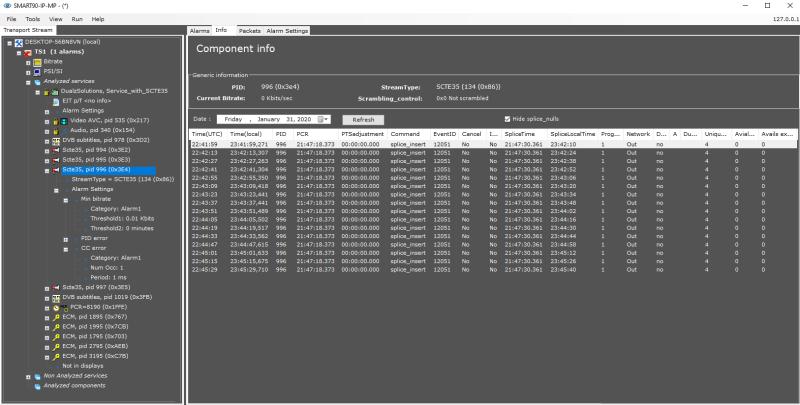
  • View SCTE-35 sections in packet view, PID info, and service info
  • Operators can review cue history without leaving the workflow
  • Export cue data to XML or CSV, and generate reports for Excel, PDF, or Word
Dualz SCTE-35 monitoring view showing cue history and operational context
Built for DVB workflows

SCTE-35 support is included in DVB monitoring

Use the same monitoring workflow to keep cue markers visible across broadcast delivery paths. That matters when the broadcast feed, cue logging, and downstream reporting have to stay aligned.
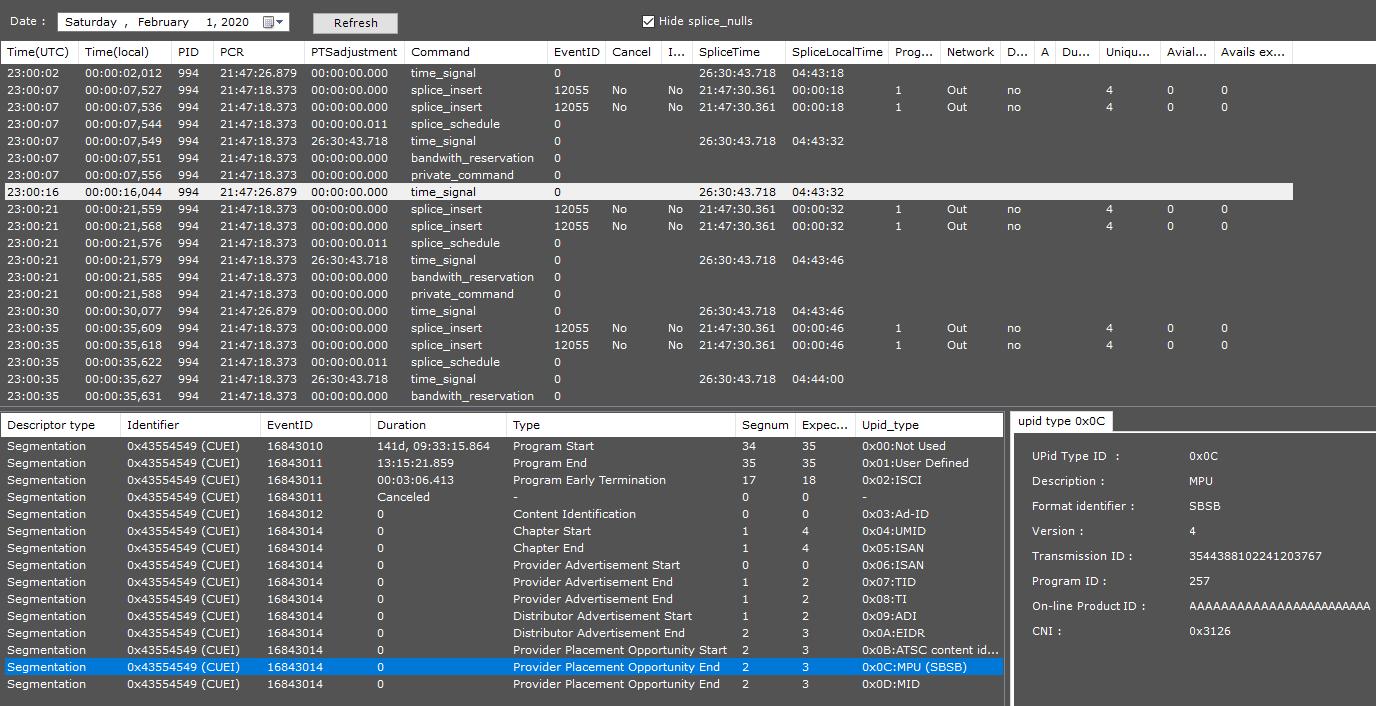
  • DVB Monitoring for broadcast cue management, regional insertion, and air-side control
  • SCTE-35:2023 support for current cue signalling workflows
  • SCTE-35 alarms in the same operational view as stream health and alarm history
  • Splice descriptor parsing and reporting support for after-the-fact review
  • Managed onboarding so the team can focus on operations, not setup overhead
Dualz SCTE-35 monitoring across DVB broadcast workflows with alarm status and service context

Ad insertion stays on cue

Marker timing is visible before it becomes a break failure, so the team can act while the event is still in flight.

Signal and service views stay aligned

Service-level and PID-level cue views can be checked against the same history instead of separate tool views.

Reports are ready to export

Operators can generate report outputs for Excel, PDF, or Word so cue history is available for incident review and evidence.

Need SCTE-35 monitoring in your DVB setup?

Talk to us and we’ll map the cueing workflow into the monitoring setup that fits your operation, including stored messages and reporting for later analysis.

See SCTE-35 cueing in the same view as your broadcast alarms

Managed monitoring for DVB workflows, with cue visibility, stored SCTE-35 messages, and reporting that helps prevent break failures and supports post-event analysis.

Contact us

Give us a bit more information about what you’d like to discuss — we’ll come back to schedule a call.

Stream type
Deployment

Find your monitoring solution